A SharePoint Blog with a difference...well actually not that different but hopefully still useful
Friday, 16 March 2012
Property doesn't exist or is used in a manner inconsistent with schema settings
I created a new search centre on a new site collection as a test and it worked ok so it meant that people search on the farm was working but there was obviously something peculiar about the migrated site collection. The solution in the end was to edit the People Core Result Web Part on the search results page and expand the “Display properties” and make sure “Use Location Visualization” is checked.
I eventually found the answer here:
Monday, 7 February 2011
Workflow does not automatically start when emailing a SharePoint Group
It seems that if the user uploading the document cannot see the membership of a SharePoint group they cannot resolve the email addresses of users within that group. The way around this is to edit the SharePoint group settings and set the "View Membership" setting to "Everyone" for the SharePoint group being emailed in the workflow. You can do this by going to Site Settings > People and Groups > Groups from the left hand navigation bar and editing the group in question.
This was also the case in MOSS 2007 and the problem and solution are described here: http://blogs.msdn.com/b/spdsupport/archive/2008/06/16/how-to-fix-sharepoint-designer-created-workflow-that-periodically-stops-and-does-not-send-emails.aspx
Tuesday, 7 December 2010
Query Server Not Responding
Thursday, 11 November 2010
FIM Service Stops after Import and User Profile Synch Connection Disappears
Friday, 1 October 2010
Event ID 3 ForeFront Identity Manager Error
After applying the August 2010 Cumulative Update for SharePoint 2010, I started to see the following error in Application Event Logs around every 30 seconds. They occurred on the server that was running the FIM Services:
EVENT ID 3
Provider: ForeFront Identity Manager
Microsoft.ResourceManagement.Service: Microsoft.ResourceManagement.Workflow.Hosting.WorkflowManagerException: Forefront Identity Management Service does not support workflows of type 'Microsoft.ResourceManagement.Workflow.Activities.SequentialWorkflow, Microsoft.ResourceManagement, Version=4.0.2450.9, Culture=neutral, PublicKeyToken=31bf3856ad364e35'. at Microsoft.ResourceManagement.Workflow.Hosting.HostActivator.ActivateHost(ResourceManagementWorkflowDefinition workflowDefinition) at Microsoft.ResourceManagement.Workflow.Hosting.WorkflowManager.StartWorkflowInstance(Guid workflowInstanceIdentifier, KeyValuePair`2[] additionalParameters
After a call to Microsoft I was told that they are "aware of the issue" and a hotfix and associated KB article will be released very soon. The product group stated that these "errors are benign".
Verdict: Harmless but annoying
Thursday, 30 July 2009
People Search Results adds a :80 Suffix to results on an External Facing Site
Had an issue where doing a People Search by connecting to my external facing SharePoint site via ISA Server 2006 on say https://extranet.domain.com was returning People search results suffixed with a ":80" so for example People Search results done externally for a particular person would return something like:
https://mysite.domain.com:80/person.aspx?guid=08AE56E0-EA14 etc which does not resolve externally
Internally everything is fine so browsing to http://intranet and performing a People Search returns the correct URL for a person as http://mysite/person.aspx?guid=08AE56 etc which is correct
AAM Settings are:
Intranet Web Application
Default Zone: http://intranet
Extranet Zone: https://extranet.domain.com
MySite Web Application
Default Zone: http://mysite
Extranet Zone: https://mysite.domain.com
This could be caused by using the same web application for both port 80 and 443 access and tests showed that this was not caused by ISA 2006 but I managed to resolve this on the external side by adding a Link Translation mapping in my ISA Server Extranet publishing rule that maps https://mysite.domain.com:80 to https://mysite.domain.com
This works fine but in environments where ISA is not used it may be prudent to extend the Web App so that you have a dedicated SSL web application which may solve the issue (haven't tested this but a colleague has this scenario and doesn't have the problem.
Alternatively, I also found the following article which resolves the issue by editing the People Search Core Results Web Part and the Search High Confidence Results Web Part.
Monday, 27 July 2009
NLB IP Address does not appear in IIS on Windows 2008
Had an interesting issue as follows - I configured Windows Network Load Balancing (NLB) on my 2 SharePoint 2007 Web Front End Servers on Windows Server 2008 SP2 64Bit and then proceeded to assign IP addresses to my Main Portal Web Application and the MySite Web Application (both web apps are on port 80 so using IP addresses to distinguish them apart rather than host headers). The weird thing is that unlike Windows 2003 NLB in Windows 2008 your load balanced Virtual IP does not appear in the list of IP addresses you can bind to the web application. Looking around on various forums it seems that this is some kind of a bug on Server 2008. A workaround for now which I used is to manually type in the Load balanced IP address in IIS when selecting from a list of IP addresses to bind to the web application.
As you can see in the example below the 172.16.0.50 is my load balanced address but does not appear in the list of IP Addresses in the drop down list so I have typed it in manually and this works:
Thursday, 25 June 2009
Access Denied messages when performing an Index Crawl and Event 2436 Warnings
Had an issue recently where I could not Crawl a SharePoint site after setting off a full crawl of my default content source and was receiving the following message "Access is denied. Check that the Default Content Access Account has access to this content, or add a crawl rule to crawl this content."
I was also getting Warnings with Event ID 2436 stating that Access was Denied.
I discovered that this was down to the Loopback problem described in KB896861 http://support.microsoft.com/kb/896861 and was caused by the site URL not having the NetBIOS name of my SharePoint server, e.g. my server was called MOSS01 but I was trying to crawl my site collection at http://portal.domain.com
I followed the instructions for "Method 1" in the article which are as follows:
To specify the host names that are mapped to the loopback address and can connect to Web sites on your computer, follow these steps:
- Click Start, click Run, type regedit, and then click OK.
- In Registry Editor, locate and then click the following registry key:
HKEY_LOCAL_MACHINE\SYSTEM\CurrentControlSet\Control\Lsa\MSV1_0 - Right-click MSV1_0, point to New, and then click Multi-String Value.
- Type BackConnectionHostNames, and then press ENTER.
- Right-click BackConnectionHostNames, and then click Modify.
- In the Value data box, type the host name or the host names for the sites that are on the local computer, and then click OK.
- Quit Registry Editor, and then restart the IISAdmin service.
I started another full crawl after an IISRESET but still received the same errors. I eventually resolved it by resetting all crawled content from the SSP Administration pages as follows:
SSP > Search Administration > Reset all crawled content
This allowed me to perform a full crawl without any errors.
Monday, 15 June 2009
Uninstall Issues with MOSS 2007, WSS Tracing Service Stuck in "Stopping" state
Had a scenario where I needed to uninstall SharePoint 2007 from a server (single MOSS server holding all roles, separate SQL server) as the customers application of SP2 had been unsuccessful so they were getting search service and SSP errors. Also the Search Administration option was not appearing in the SSP (which is part of the Infrastructure updates and should also appear when SP2 is applied). I recreated the SSP and Search Administration appeared but I was still getting lots of Search and SSP errors. In the end I didn’t trust the implementation anymore and decided to reinstall SharePoint cleanly.
Uninstalling SharePoint was unsuccessful as the WSS Tracing service could not be stopped and was stuck in a “Stopping” state. I had no choice but to cancel uninstall and was prompted to reboot the server. Rebooting the server and trying to uninstall again prompted a message saying “Product Installer could not be found..” I could see that the SharePoint services such as WSS Timer, Office SharePoint Search etc were still present in the services console (in a disabled state). So I now had a semi-uninstalled SharePoint server.
There are many articles on how to uninstall SharePoint manually which involve removing registry keys etc but in the end I resolved the uninstall issue by installing MOSS with SP1, it allowed me to do this even though it had not cleanly uninstalled the previous MOSS version on the server. After installing I cancelled the running of the SharePoint Config Wizard and went to add/remove programs and uninstalled the MOSS with SP1 I had just put on. This allowed a clean uninstall of SharePoint. This then allowed me to install MOSS on a "clean" server.
Wednesday, 3 June 2009
Restoring a Site Collection based on the Publishing Portal template loses logo and Top Nav Bar Colour
I created a vanilla site collection using the Publishing Portal template. Backed it up using stsadm –o backup command line then restored it over the same site collection using the stsadm –o restore command line. This resulted in the site Master Page changing appearance as follows:
Before (Vanilla newly created):
After (backed up and restored over vanilla):
As you can see the Top Navigation bar is white and the logo in the top left has disappeared.
I managed to resolve this by opening the Master Page in SharePoint Designer, not checking it our, altering it or saving it, JUST opening it. This fixed the issue. I am running MOSS 2007 SP2. I tried this on another SP2 system and got the same results.
Very strange that just looking at the Master Page in SPD 2007 fixes this.
Friday, 15 May 2009
Remote File Share Access Via SharePoint


As you can see this has a nice tree view.
Monday, 16 March 2009
MOSS February 2009 Cumulative Updates Break 64bit Adobe iFilter v9
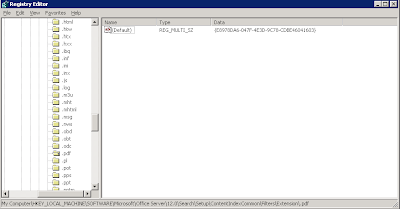
- While still in RegEdit, within the left-side tree, browse to: \\HKEY_LOCAL_MACHINE\SOFTWARE\Microsoft\Office Server\12.0\Search\Setup\ContentIndexCommon\Filters\Extension\.pdf
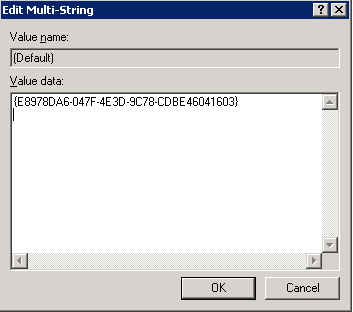
- Ensure that the values match the following as shown.
Default = {E8978DA6-047F-4E3D-9C78-CDBE46041603}


Wednesday, 11 March 2009
Backup Exec Remote Agent stops when restoring a site
Event Type: ErrorEvent Source: Application ErrorEvent Category: (100)Event ID: 1000 Date: 11/03/2009Time: 13:59:47User: N/AComputer: UKOSPSQLTEST01Description:Faulting application beremote.exe, version 12.5.2213.0, faulting module bedssps3.dll, version 12.5.2213.0, fault address 0x00000000000483df.
This issue was finally resolved by going into Central Administration > Application Management > Policy for Web Application and then adding the Backup Exec Service account with Full control permissions to the Web Application containing the site you are trying to restore.
Wednesday, 4 March 2009
Going into Search Settings in SSP is very slow
http://mrvsharepoint.blogspot.com/2009/02/when-you-to-search-settings-you-get.html
I eventually found an article on the web that alluded to a similar problem in a .Net application where in there case the application was trying to download a certificate revocation list from Microsoft. You can read about it here http://www.dotnetscraps.com/dotnetscraps/post/ASPNET-Response-time-is-very-slow-for-the-first-request-to-application-(452b-seconds).aspx
I then realised that the account I was using to log in to my servers was not permitted access to download files from Microsoft as I was on a customer site and this was part of their security policy. Once access to the internet was negotiated for the account the Search Settings issue resolved itself. As to what exactly it was trying to download is still a mystery.
Thursday, 19 February 2009
When you to Search settings you get "Authentication failed because the remote party has closed the transport stream." and you get Event 6482 errors
"Authentication failed because the remote party has closed the transport stream."
Looking in Event Viewer I was getting an Event 6482 error every minute as follows:
Event Type: ErrorEvent Source: Office SharePoint ServerEvent Category: Office Server Shared Services Event ID: 6482Date: 19/02/2009Time: 09:39:43User: N/AComputer: UKOSPWFE01Description:Application Server Administration job failed for service instance Microsoft.Office.Server.Search.Administration.SearchServiceInstance (7eb931e4-0269-447d-acec-dabe2f151f33).
Reason: The underlying connection was closed: An unexpected error occurred on a send.
Techinal Support Details:System.Net.WebException: The underlying connection was closed: An unexpected error occurred on a send. ---> System.IO.IOException: Authentication failed because the remote party has closed the transport stream. at System.Net.Security.SslState.StartReadFrame(Byte[] buffer, Int32 readBytes, AsyncProtocolRequest asyncRequest) at System.Net.Security.SslState.StartReceiveBlob(Byte[] buffer, AsyncProtocolRequest asyncRequest) at System.Net.Security.SslState.ForceAuthentication(Boolean receiveFirst, Byte[] buffer, AsyncProtocolRequest asyncRequest) at System.Net.Security.SslState.ProcessAuthentication(LazyAsyncResult lazyResult) at System.Threading.ExecutionContext.Run(ExecutionContext executionContext, ContextCallback callback, Object state) at System.Net.TlsStream.ProcessAuthentication(LazyAsyncResult result) at System.Net.TlsStream.Write(Byte[] buffer, Int32 offset, Int32 size) at System.Net.PooledStream.Write(Byte[] buffer, Int32 offset, Int32 size) at System.Net.ConnectStream.WriteHeaders(Boolean async) --- End of inner exception stack trace --- at Microsoft.Office.Server.Search.Administration.SearchApi.RunOnServer[T](CodeToRun`1 remoteCode, CodeToRun`1 localCode, Boolean useCurrentSecurityContext, Int32 versionIn) at Microsoft.Office.Server.Search.Administration.SearchApi..ctor(WellKnownSearchCatalogs catalog, SearchSharedApplication application) at Microsoft.Office.Server.Search.Administration.SearchServiceInstance.Synchronize() at Microsoft.Office.Server.Administration.ApplicationServerJob.ProvisionLocalSharedServiceInstances(Boolean isAdministrationServiceJob)
I had never seen this before so at first I thought it was something to do with the December cumulative updates but googling it I found this http://support.microsoft.com/kb/962928 which goes on to explain that you get this problem when the following conditions are true:
- The server that is running Office SharePoint Server 2007 has the query role in a server farm. (yep, two of them do)
- The roles of the query server and the index server are not on the same server in the server farm. (yep, 1 index server and the query roles are on the two front ends)
- The server farm was updated with Microsoft .NET Framework 3.5 Service Pack 1 (SP1). (yep, did this and this was the likely cause of the problem according to the MS article)
According to the article this causes the self-issued certificate that is used by the Office Server Web Services to become corrupted.
The solution involved downloading the IIS 6 Resource Kit and also applying an update for the .NT Framework 3.5 SP1. Full details taken from the article are as follows:
- Stop the Windows SharePoint Services Search service. To do this, follow these steps:
Click Start, click Run, type cmd , and then click OK. - At the command prompt, type net stop osearch, and then press ENTER.
Type exit to exit the command prompt. - Download and install the IIS 6.0 Resource Kit Tools. To obtain the IIS 6.0 Resource Kit Tools, visit the following Microsoft Web site:
http://www.microsoft.com/downloads/details.aspx?familyid=56FC92EE-A71A-4C73-B628-ADE629C89499 (http://www.microsoft.com/downloads/details.aspx?familyid=56FC92EE-A71A-4C73-B628-ADE629C89499)
On each server in the farm that has Office SharePoint 2007 installed, follow these steps:
- Click Start, click Run, type cmd , and then click OK.
At the command prompt, type selfssl /s:951338967 /v:1000, and then press ENTER. Where 951338967 is the default ID of the Office Server Web Services certificate and
1000 is the number of days that the certification will be valid. - Start the Windows SharePoint Services Search service. To do this, follow these steps:
At the command prompt, type net start osearch, and then press ENTER.
Type exit to exit the command prompt. - Download and install the following update to the .NET Framework 3.5 SP1. For more information, click the following article number to view the article in the Microsoft Knowledge Base:
959209 (http://support.microsoft.com/kb/959209/ ) An update for the .NET Framework 3.5 Service Pack 1 is available
Now I did all of this but still had the same problem so stopped and started the Search Service from within Central Administration, Services on Server and this eventually fixed it.
Friday, 13 February 2009
SharePoint 2007 Disaster Recovery Resources
Whilst the training material goes through the basics of the Recycle Bin etc what I found particlularly useful was the PowerPoint slide deck as it lists Pro's and Con's of the different approaches - SharePoint Native backup vs SQL Backup.
The PowerPoint also depicts failover methods like SQL Clustering and Log shipping also listing Pro's and Con's of each one. The only downside is that it does not mention SQL mirroring.
Get the PowerPoint from here http://download.microsoft.com/download/a/b/1/ab13fe7e-2b58-4173-9a7e-f3140e215181/DSK-106_PPT_and_Transcript.exe
Monday, 20 October 2008
Error changing SMTP settings in IIS Manager after configuring incoming email in the farm
After configuring incoming mail settings on a MOSS farm I started to get an unspecified SMTP error when I tried changing SMTP settings from within IIS Manager. Further investigation revealed that the issue was caused by my applying the hotfix (KB946517) to resolve Event ID 6398, 7076 and 6432 errors.
The problem is described in detail here on the MSDN blog http://blogs.msdn.com/vijaysk/archive/2008/04/14/issue-smtp-configuration-unspecified-error.aspx
and the subsequent Microsoft Knowledgebase article is here http://support.microsoft.com/default.aspx/KB/950426
A hotfix is now available from Microsoft which resolves this issue.

Sunday, 12 October 2008
Clicking on a user clickable link does not redirect to the Person.aspx page but stays on the Userdisp.aspx page instead
There are a number of thoughts on why this happens and each of these are published around the web ranging from the redirect getting confused by AAM settings to a bug where your portal FQDN and your MySites FQDN do not share the same root URL (e.g http://intranet/ and http://mysite/). I have tested this and found this problem does not occur if for example you have the following URL's http://intranet/ and http://intranet:8088/ being the MySite URL. This would seem to support the "Same Root URL" theory.
They way this was resolved by myself and my colleague Ajay Chauhan (http://sharepointetcetera.blogspot.com/) who was working on this particular project with me was to set up a Portal Site Connection on the Site Collection(s) that have this problem and the MySite host. Now this isn't ideal but we specified the name of the connection as a full stop to make it as inconspicuous as possible to users (as shown below). This full stop does appear in the breadcrumb trail on the top left hand of pages though.

Update:
Looking around I believe this may be resolved in SP2.
More details can be found in this blog by Larry Kuhn http://sharepoint.microsoft.com/blogs/LKuhn/Lists/Posts/Post.aspx?ID=47
Monday, 22 September 2008
How to get a link to go back to the parent site after you have deleted a site
Problem: When you delete a site you don’t get a link to go back to the parent site (in fact no links at all)
Solution: http://sharepointsherpa.com/2008/04/08/sharepoint-2007-back-link-after-deleting-a-site
Thursday, 3 July 2008
Backup Exec not backing up Web Apps with Parentheses
An error was encountered while attempting to browse the contents of SiteName (xx)\Content-DB 1 (SQLServerName\SQLInstanceName\DatabaseName). A network connection to the server could not be established.
The error occurs if you use Parentheses () in your web application names. Further details are provided in the following article: http://seer.entsupport.symantec.com/docs/294620.htm
In other words if you have a Web Application called “SharePoint (MySite)” and one called “SharePoint (Portal)”. Backup exec will not back this up.
Symantec claim this issue is fixed with the release of version 12.5 of Backup Exec.